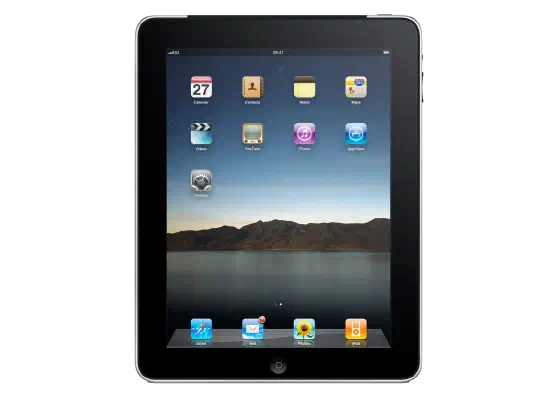
iOS 4.3 (8F190) for iPad 1
✗ This firmware is not signed. This means you cannot restore to it in Finder, the Apple Devices app, iTunes, or idevicerestore.
Your download should begin shortly. If it does not, you can download it directly here:
Download (597 MiB)This firmware is not signed. This means you cannot restore to it in Finder, the Apple Devices app, iTunes, or idevicerestore. The instructions below are included for reference only.
Windows
- Install the latest version of Apple Devices from the Microsoft Store.
- Plug your iPad 1 in to your PC.
- Open Apple Devices, and navigate to your iPad 1.
- Hold the Shift key on your keyboard, and press "Restore".
- Select the
iPad1,1_4.3_8F190_Restore.ipswfile that you downloaded. - Wait for the restore to complete, and the iPad 1 to reboot.
macOS
- Plug your iPad 1 in to your Mac.
- Navigate to your iPad 1 in Finder.
- Hold the Option or Alt key on your keyboard, and press "Restore".
- Select the
iPad1,1_4.3_8F190_Restore.ipswfile that you downloaded. - Wait for the restore to complete, and the iPad 1 to reboot.
Linux
- Install idevicerestore.
- Plug your iPad 1 in to your PC.
- Open a terminal, and navigate to the IPSW file that you downloaded, e.g.
cd ~/Downloads - To perform a full erase restore, type
idevicerestore -e iPad1,1_4.3_8F190_Restore.ipswand press enter. - Wait for the restore to complete, and the iPad 1 to reboot.
Windows
- Open PowerShell, and navigate to the IPSW file that you downloaded, e.g.
cd Downloads - Type
Get-FileHash iPad1,1_4.3_8F190_Restore.ipsw -Algorithm SHA1 - The output of the command should match the following checksum:
fc97d5959a1e29d707586871004ea12e95815237. If it doesn't, you may need to redownload the file.
macOS
- Open a terminal, and navigate to the IPSW file that you downloaded, e.g.
cd ~/Downloads - Type
openssl sha1 iPad1,1_4.3_8F190_Restore.ipsw - The output of the command should match the following checksum:
fc97d5959a1e29d707586871004ea12e95815237. If it doesn't, you may need to redownload the file.
Linux
- Open a terminal, and navigate to the IPSW file that you downloaded, e.g.
cd ~/Downloads - Type
openssl sha1 iPad1,1_4.3_8F190_Restore.ipsw - The output of the command should match the following checksum:
fc97d5959a1e29d707586871004ea12e95815237. If it doesn't, you may need to redownload the file.
Checksums
| SHA256sum | 59f1c55614613fb0db30d858792e2fa056894f63d71b5c99d0a0b98437d12234 |
|---|---|
| MD5sum | 59f1c55614613fb0db30d858792e2fa056894f63d71b5c99d0a0b98437d12234 |
| SHA1sum | fc97d5959a1e29d707586871004ea12e95815237 |
iOS 4.3 Software Update
This update contains new features and improvements, including the following:
• Personal Hotspot*
- Share iPhone 4 cellular data connection with up to 5
devices (combination of up to 3 Wi-Fi, 3 Bluetooth,
and 1 USB)
• iTunes Home Sharing
- Play music, movies and TV shows from a shared iTunes
library on a Mac or PC (requires iTunes 10.2)
• New AirPlay features**
- Play videos from the Photos app including the Camera
Roll album, iTunes previews, enabled third-party apps
and websites on Apple TV
- Play slideshows from Photos on Apple TV using
transitions available on Apple TV
• Faster Safari performance with Apple Nitro JavaScript
engine
• HD video out using the Apple Digital AV Adapter***
- View 720p HD videos from Videos app, iPod app,
Photos, YouTube, Safari, Keynote, and enabled
third-party apps on an HDMI display
• Ping features
- Push notifications for comments and follow requests
- Post and Like songs directly from the Now Playing
screen
- Parental controls
• New Settings
- Messages setting for number of times to repeat an
alert
- iPad side switch setting to lock screen rotation or mute
audio notifications and sound effects
• Single tap conference call dialing with a pause to send
a passcode
• Bug fixes
Products compatible with this software update:
• iPhone 4 (GSM model)
• iPhone 3GS
• iPad
• iPod touch (4th generation)
• iPod touch (3rd generation)
*Requires iPhone 4 with tethering data plan
**Requires Apple TV (2nd generation) running software
version 4.2 or later
***iPhone 4, iPad, iPod touch (4th generation)
For information on the security content of this update, please visit: